
Social Media
Best Fonts for Instagram Bio (Copy and Paste) — 2026 Guide
Best fonts for Instagram bio - copy-paste bold, cursive, and aesthetic Unicode text styles. Upgrade your Instagram profile with stylish fancy fonts free.
Contents
- Why Your Instagram Bio Font Catches the Eye First
- Fonts for Instagram Bio Styles That Work
- Cursive/Script Fonts for Instagram Bio
- Bold Fonts for Instagram Bio
- Aesthetic/Y2K Fonts for Instagram Bio
- Bubble Text for Instagram Bio
- Gothic/Dark Fonts for Instagram Bio
- Small Caps Fonts for Instagram Bio
- How to Use the Free Font Generator — Step by Step
- Instagram-Specific Tips and Compatibility Notes
- Common Mistakes and How to Fix Them
- Frequently Asked Questions
- How do I get cool fonts for my Instagram bio?
- Do Instagram bio fonts work on Android?
- What is the best font style for an Instagram bio?
- Why do my fonts look different on someone else's phone?
- How many special characters can I put in my Instagram bio?
Why Your Instagram Bio Font Catches the Eye First
Fonts for Instagram bio work best when they help a visitor understand your profile faster, not when they decorate every line. When someone visits your profile cold — from a hashtag, a tagged post, or a follower suggestion — they spend a few seconds deciding whether to follow. During that short moment, a styled first line can make the bio read as intentional instead of generic.
The reason Unicode font styles stand out is that they are not fonts at all. A regular "A" is the Unicode character U+0041. The letter "𝗔" in bold mathematical text is U+1D400 — a completely different character. Phones render them differently because they are different characters, not because any font was installed or changed.
The key point: When you paste styled Unicode text into your Instagram bio, visitors see different characters — not a different font. Every modern smartphone displays them correctly because they are part of the Unicode standard, which every operating system supports by default. No app, no install, no settings change required.
Fonts for Instagram Bio Styles That Work
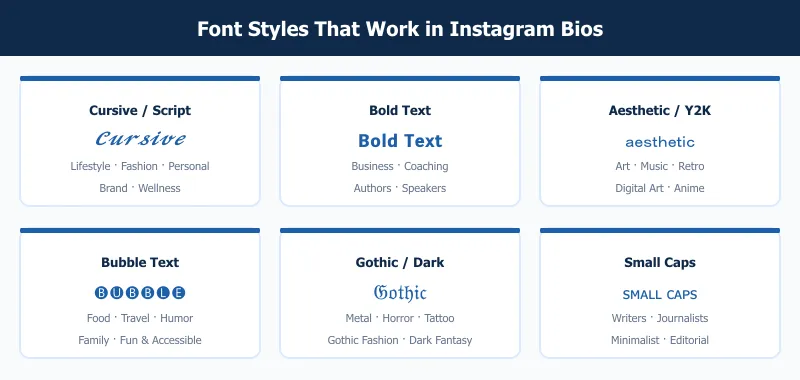
Here are the six most effective fonts for instagram bio, with real examples and specific use cases for each.
Cursive/Script Fonts for Instagram Bio
Example: 𝓒𝓾𝓻𝓼𝓲𝓿𝓮 𝓑𝓲𝓸 𝓣𝓮𝔁𝓽
Mathematical Script Bold characters give your bio a handwritten, flowing look. The letters are distinct from regular italic text — they read as personal and warm, and they hold up well at the small size of a mobile bio.
Use this for: lifestyle accounts, fashion profiles, personal branding, wellness creators, wedding services, coaching.
Tip: Apply this style to one line — your name or tagline. Writing an entire multi-line bio in script makes it slow to scan on a small screen.
Bold Fonts for Instagram Bio
Example: 𝗬𝗼𝘂𝗿 𝗡𝗮𝗺𝗲 𝗛𝗲𝗿𝗲
Mathematical Sans-Serif Bold reads clean at small sizes and makes a single line stand out above everything else. It is the closest Unicode equivalent to setting a header in a publishing tool.
Use this for: business accounts, coaches, consultants, speakers, and brands where the name or tagline needs to dominate visually.
Tip: Put your bold line first. Visitors read the opening line even when they do not finish the rest of the bio.
Aesthetic/Y2K Fonts for Instagram Bio
Example: aesthetic vibes
Fullwidth Latin characters use the same width as Japanese glyphs — each letter is wide and evenly spaced. The result is immediately recognizable as internet-aesthetic, tied to Y2K nostalgia, early-internet references, and digital art culture.
Use this for: art accounts, music profiles, anime fan accounts, retro or vintage aesthetics, creative portfolios.
Tip: Use fullwidth characters for short bursts — a single word or short phrase. A full sentence in fullwidth takes noticeably longer to read.
Bubble Text for Instagram Bio
Example: 🅑🅤🅑🅑🅛🅔 🅣🅔🅧🅣
Enclosed alphanumeric characters place each letter inside a solid circle. The look is immediately playful and friendly, and it stands out even at thumbnail size when someone sees your profile at a small preview.
Use this for: food accounts, travel creators, humor pages, family accounts, anyone whose profile tone is approachable and fun.
Tip: Bubble characters are physically wider than standard letters, so your bio fills the 150-character limit faster. Write the plain text version first and check the length before applying the style.
Gothic/Dark Fonts for Instagram Bio
Example: 𝔊𝔬𝔱𝔥𝔦𝔠 𝔗𝔢𝔵𝔱
Fraktur Unicode characters reproduce the look of blackletter typography — medieval German printing style, now associated with metal music, gothic fashion, tattoo culture, and dark aesthetic content.
Use this for: metal music, gothic and dark fashion, horror content creators, tattoo artists, dark fantasy fiction accounts.
Tip: One word or your name in Gothic, then plain text for the rest. A full bio in Fraktur becomes difficult to parse quickly — the style works as an accent, not a body text replacement.
Small Caps Fonts for Instagram Bio
Example: ꜱᴍᴀʟʟ ᴄᴀᴘꜱ ᴛᴇxᴛ
Small caps Unicode characters look like capital letters set at lowercase height. The result is clean and editorial — it reads like a print magazine subheading without pointing at any specific subculture or style community.
Use this for: writers, journalists, editors, thought-leaders, minimalist brands, any account that wants a polished look without being flashy.
Tip: This is one of the safest styles for cross-device compatibility. Small caps characters have wide support in both iOS and Android system fonts, and they render cleanly on older devices too.
How to Use the Free Font Generator — Step by Step
Getting styled text from FontifyText into your bio takes about 90 seconds the first time.

- Go to the free font generator — the page loads in your browser with no sign-up required.
- Type your bio text into the input box at the top of the page.
- Scroll through the font styles shown below the input. They update in real time as you type.
- Find the style you want and click the Copy button next to it.
- Open Instagram on your phone → tap Edit Profile → tap Bio.
- Long-press in the bio field and tap Paste.
- Preview how it looks on mobile before saving — some styles read better at small sizes than others.
The whole process happens in your browser. Nothing gets downloaded or installed. You can also use the same free font generator for captions, comments, and your display name.
Instagram-Specific Tips and Compatibility Notes
These are the details most people find out the hard way.
The line break trick. Instagram removes line breaks when you type directly in the bio field on the app. The fix: draft your bio in your phone's Notes app, put a period on a blank line between sections, then copy the entire text and paste it into the bio field. Instagram preserves the structure.
iPhone vs. Android rendering. Bold, italic, cursive script, and small caps render correctly on Android 7 and above, which covers the vast majority of active devices in 2026. Bubble text (enclosed alphanumerics) and some box-drawing characters can show as empty squares on Android 6 and older. If your audience skews toward older devices, small caps or bold are the reliable choices.
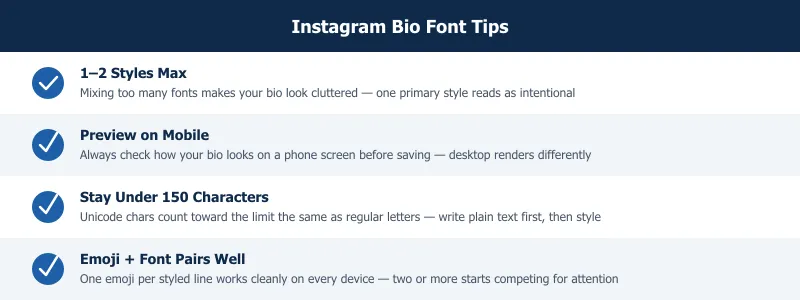
Emoji alongside Unicode text. Emoji and styled Unicode characters coexist cleanly. A fire emoji before a cursive line looks correct on every device. Keep it to one emoji per line — two or more emoji next to styled text starts to compete for attention and the line becomes harder to scan.
The 150-character count. Every Unicode character — including styled Mathematical Alphanumeric letters — counts as one character toward your limit. A fullwidth "A" has the same character count as a plain "A". The only exception is some emoji, which Instagram counts as two characters due to multi-codepoint encoding. To stay safe: write your text in under 140 characters before applying a style, which leaves room for a period and one emoji.
Common Mistakes and How to Fix Them
Using styles that break on older devices. Stick to Mathematical Alphanumeric Symbols (bold, italic, script, Fraktur, double-struck) and Unicode Latin Extended ranges (small caps). These have glyph coverage in modern system fonts. Avoid pulling text from obscure Unicode blocks — Braille patterns, box-drawing characters, and combining diacritics can render as squares on Android 6 and below.
Pasting into the wrong field. Bio text and caption text render at different sizes. A style that looks balanced in a caption might feel cramped or oversized in a bio. Always test the paste specifically in the bio field on a phone, not a desktop browser or the Instagram web app.
Mixing three or more styles in one bio. One primary style plus plain text reads as deliberate. Two different styles can work if they serve distinct visual roles — name versus tagline, for example. Three styles in one bio looks scattered, and every line competes for attention instead of building a cohesive identity.
Skipping the mobile preview. Instagram's Edit Profile screen on desktop and on mobile render text slightly differently. After saving your bio, open your profile from a fresh browser tab or another device. That is what visitors actually see — not the editing interface.
Frequently Asked Questions
How do I get cool fonts for my Instagram bio?
Use the free font generator at FontifyText. Go to the site, type your bio text into the input box, and scroll through the styles that appear below it. Every style updates instantly as you type. When you find one you like, click Copy, then paste directly into the Instagram bio field on your phone. No account is needed, nothing is installed, and the styles work on every current iPhone and Android device. The whole process takes under two minutes the first time.
Do Instagram bio fonts work on Android?
Yes. The Unicode styles available through FontifyText — including Mathematical Script (cursive), Mathematical Sans-Serif Bold, Small Caps, and Fraktur — display correctly on Android 7 and above. That covers Samsung Galaxy, Google Pixel, OnePlus, and most other current Android phones. Some very old devices running Android 6 may show empty squares for a few character types, but the most popular styles render correctly on the devices people are actually using today. If you are unsure, cursive and bold are the safest cross-device picks.
What is the best font style for an Instagram bio?
It depends on your niche. Cursive script is the top choice for lifestyle, fashion, and personal accounts — it reads as warm and personal. Bold Unicode works best when you want one line, your name or tagline, to visually dominate the bio. Small caps is the most versatile option: it adds a polished, editorial look without sending a strong style signal, which makes it effective across most account types. These fonts for instagram bio choices should match your overall content tone, not just look visually interesting in isolation.
Why do my fonts look different on someone else's phone?
The Unicode characters are identical across devices — what varies is the system font that renders them. On iOS, San Francisco handles Mathematical Alphanumeric characters with specific proportions. On Android, the Noto font family fills those same characters but with slightly different stroke weights and spacing. The style reads as the same style on both platforms; the rendering is just a few pixels different. This is the same reason regular text looks slightly different on iOS versus Android — it is a font rendering difference, not a character difference.
How many special characters can I put in my Instagram bio?
Instagram allows 150 characters in the bio field. Every Unicode character, including styled letters from Mathematical Alphanumeric Symbol blocks, counts as exactly one character. Most standard emoji count as one character in Instagram's counter. Some multi-codepoint emoji — flag emoji and certain skin-tone modifier combinations — count as two. A safe approach: write your bio in plain text first and keep it under 130 characters. That leaves room for line-break periods and one or two emoji without hitting the limit by accident.
Pick the style that fits your profile and paste it in — the whole thing takes under two minutes. Try the free font generator and see which style looks right for your account. If you also post on TikTok, the guide on TikTok caption fonts covers the same process for captions across that platform.