
Social Media
How to Get Cool Fonts on TikTok Captions — Free Generator
Best fonts for TikTok captions - copy-paste bold, fancy, and glitch Unicode text free. Make your TikTok bios and captions stand out. Works everywhere.
Contents
- Why Styled TikTok Caption Text Changes Watch Behavior
- Fonts for TikTok Captions That Work
- Bold Text for TikTok Captions
- Italic Text for TikTok Captions
- Glitch/Cursed Text for TikTok Captions
- Aesthetic Text for TikTok Captions
- ALL CAPS Small Caps for TikTok Captions
- How to Add Fonts for TikTok Captions
- Fonts for TikTok Captions Tips That Actually Make a Difference
- Caption Mistakes That Actually Hurt Your TikTok
- Frequently Asked Questions
- Can I use fancy fonts in TikTok captions?
- What font does TikTok use by default?
- How do I make my TikTok captions stand out?
- Do TikTok font generators require an app?
- Why do my TikTok captions look different on other phones?
Why Styled TikTok Caption Text Changes Watch Behavior
Fonts for TikTok captions can help a short line stand apart from the default caption text under a video. When a viewer opens TikTok and sees styled text in the caption — bold Unicode, unusual letter spacing, or glitch-style characters — the line gets noticed faster. A caption is still there to communicate, so the style should support the message instead of making it harder to read.
Plain captions do not signal anything. They read as default. Styled text signals that the creator pays attention to presentation.
The direct answer: Styled Unicode fonts for tiktok captions work because TikTok's caption field accepts any Unicode text. You paste styled characters, TikTok displays them exactly as entered. Every viewer's phone renders them because Unicode is built into every modern operating system — no app required, no special settings needed.
Fonts for TikTok Captions That Work
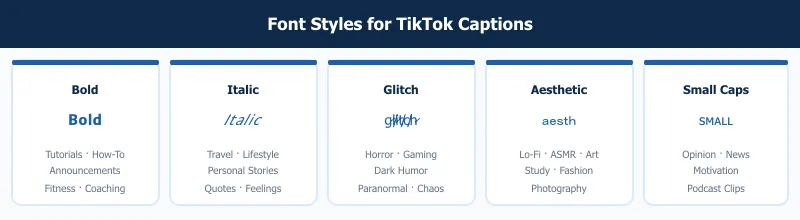
These five styles each serve a different content type. Match the style to the tone of your video.
Bold Text for TikTok Captions
Example: 𝗧𝗵𝗶𝘀 𝗰𝗮𝗽𝘁𝗶𝗼𝗻 𝗶𝘀 𝗯𝗼𝗹𝗱
Mathematical Sans-Serif Bold renders as heavy, clean text that reads fast. On TikTok, the caption sits in small text below the video. Bold characters look heavier than the surrounding interface text, so they stand out without looking out of place.
Best for: tutorials, how-to content, announcements, fitness, productivity, and any video where you want the caption to reinforce a key message quickly and clearly.
Tip: Bold works best on the first line of a two-line caption. The second line in plain text acts as contrast, drawing the eye down to read both lines naturally.
Italic Text for TikTok Captions
Example: 𝘛𝘩𝘪𝘴 𝘪𝘴 𝘪𝘵𝘢𝘭𝘪𝘤 𝘵𝘦𝘹𝘵
Mathematical Sans-Serif Italic has a slight lean that reads as conversational and expressive. It does not stand out as dramatically as bold, but it creates a clear visual difference from default text without signaling a specific aesthetic.
Best for: travel, lifestyle, personal stories, quotes, and captions that are meant to feel like a spoken aside rather than a structured announcement.
Tip: Italic works well as the second line of a caption when you use bold on the first. The contrast between the two styles creates a visual hierarchy that feels natural and easy to read in sequence.
Glitch/Cursed Text for TikTok Captions
Example: g̷l̸i̷t̸c̸h̷ ̷t̸e̴x̷t̸
Glitch text uses Unicode combining diacritical marks that stack above and below each letter, creating a corrupted, glitching appearance. It is deliberately hard to fully parse — which is exactly the point.
Best for: horror content, gaming highlights, dark humor, paranormal themes, and any video meant to feel unsettling or deliberately chaotic. The style signals immediately to viewers familiar with internet culture.
Tip: Use glitch text for a single word or short phrase, not the entire caption. A full sentence in glitch text becomes unreadable quickly, and you lose the information the caption is supposed to carry.
Aesthetic Text for TikTok Captions
Example: aesthetic caption
Fullwidth Latin characters are each as wide as a Japanese character. They create the slow, spaced-out rhythm associated with lo-fi aesthetics, soft-focus content, and digital-nostalgia visual styles.
Best for: art content, study-with-me videos, ambient and ASMR content, fashion, photography, and any video where the mood is calm and unhurried.
Tip: A single word in fullwidth can anchor the entire caption. "studying" as a standalone caption communicates the same information as three words in plain text and carries much more visual character.
ALL CAPS Small Caps for TikTok Captions
Example: ꜱᴍᴀʟʟ ᴄᴀᴘꜱ ᴄᴀᴘᴛɪᴏɴ
Small caps Unicode characters look like capital letters at lowercase height — simultaneously assertive and clean. The effect is editorial and neutral, which makes it effective across most content categories without sending a strong style signal.
Best for: news commentary, opinion content, motivational captions, and podcast clips. It also suits creators who want a polished look without the heavy presence of bold or the strangeness of glitch text.
Tip: Small caps is one of the most compatible styles across different devices. It renders clearly on both iOS and Android without fallback issues, making it a solid all-audience choice.
How to Add Fonts for TikTok Captions
The process works the same whether you are posting a new video or editing a draft.
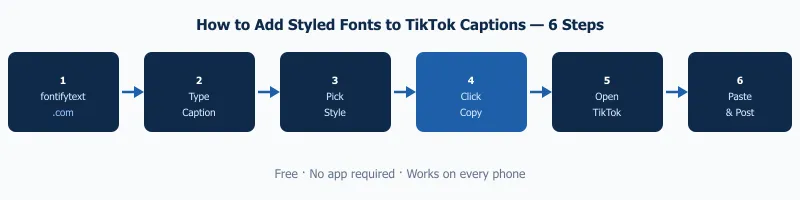
- Open the free font generator in your browser — no sign-in needed.
- Type your caption text into the input box at the top of the page.
- Scroll through the font styles below and pick the one that fits your video's tone.
- Click Copy next to the style you want.
- Open TikTok on your phone and open or create your video.
- Tap the caption or description field and long-press → Paste.
- Post your video, then view it in the actual feed to confirm the caption looks the way you intended.
Use the free font generator each time you post, or keep a few pre-styled phrases saved in your notes app for quick reuse across multiple videos.
Fonts for TikTok Captions Tips That Actually Make a Difference
TikTok's caption field fully supports Unicode. Unlike some older platforms that strip or mangle special characters, TikTok preserves Unicode text exactly as pasted. What you paste is what viewers see — on iPhones, Android phones, and TikTok's web player. The styled characters survive the upload process without being converted or stripped.
How styled captions affect the way people watch. A caption in bold or aesthetic fullwidth text creates visual contrast with TikTok's standard interface. Viewers' eyes move toward things that look different. They read the caption for longer than they would read plain text. Even a little extra attention can support the watch-time signals TikTok uses.
Using one styled line with plain text for contrast. A caption with a bold or italic first line and plain text second line is easy to read and visually distinct. The styled line acts as a heading; the plain text delivers the detail. This two-tier structure reads naturally without looking like it is trying too hard.
Combining a font style with one emoji. One emoji at the end of a styled caption works cleanly on every device. The emoji acts as punctuation — it adds tone without competing with the text styling. More than one emoji per styled caption starts to look busy at the small size captions are displayed in the feed.
Caption Mistakes That Actually Hurt Your TikTok
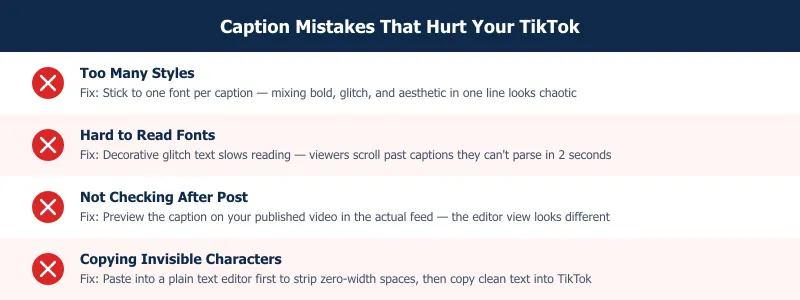
Using too many different styles in one caption. A caption that mixes bold, glitch, and aesthetic fullwidth characters in the same sentence reads as random. Pick one style and use it consistently within a caption. Mixing works only when styles serve clearly different roles — a styled heading followed by plain body text, for example.
Not checking how the caption looks after posting. The TikTok creation interface and the actual published feed render captions at different sizes and with different surrounding context. Always go to your published video and check the caption in the actual feed view before you assume it looks the way you intended.
Copying text that contains invisible Unicode characters. Some tools embed zero-width spaces, word joiners, or variation selectors in their output. These invisible characters can cause odd spacing or unexpected line breaks in your caption. Fix: paste styled text into a plain text editor first. Notes on iOS or any standard Android text field works. Check for odd spacing, then copy from there and paste into TikTok.
Using fonts that are too decorative to read in two seconds. TikTok viewers scroll fast. Glitch text or certain highly ornate Unicode styles take longer to parse than bold or italic. If your caption contains useful information — a tip, a question, a call to action — use a readable style. Save the decorative styles for single-word statements where instant readability matters less than visual impact.
Frequently Asked Questions
Can I use fancy fonts in TikTok captions?
Yes. TikTok's caption field accepts Unicode text directly, which means styled characters — bold, italic, script, small caps, glitch, and others — display exactly as pasted. The fonts for tiktok captions you add through a generator like FontifyText work on iOS, Android, and the web player. You do not need a special keyboard, a TikTok font app, or any additional software installed on your device.
What font does TikTok use by default?
TikTok uses a system font that varies by device. On iOS it is a variant of San Francisco; on Android it is typically Roboto or the manufacturer's default sans-serif. TikTok's in-video text overlay tool has its own set of built-in options. However, the caption field below the video is plain Unicode text. It displays whatever characters you paste, with no extra formatting from TikTok's system.
How do I make my TikTok captions stand out?
Use a styled Unicode font for the first line of your caption to create visual contrast with standard interface text. Bold or italic Mathematical Sans-Serif styles are the most readable options and work across all current devices. Keep the styled portion to one line and use plain text for the rest. Another clean option is a single styled word with one emoji. The goal is to catch the eye fast, not to make the caption take effort to read.
Do TikTok font generators require an app?
No. FontifyText runs in any web browser on your phone or desktop. You visit the site, type your caption, pick a style, and copy. There is no app to install, no account to create, and no permissions to grant. The free font generator works for TikTok captions, Instagram bios, Discord usernames, WhatsApp messages, Twitter bios, and any text field that accepts Unicode input.
Why do my TikTok captions look different on other phones?
The Unicode characters in your caption are identical across all devices — what varies is the system font each device uses to render them. iOS uses Apple's system fonts and Android uses the Noto family, resulting in small differences in stroke weight and letter spacing. The style reads as the same style on both platforms. Small variation is normal and similar to how regular Latin text differs between iOS and Android. The characters themselves do not change.
Style your captions with the same care you put into your content. Head to the free font generator and try a few styles on your next video's caption before you post. If you also use Instagram, the guide on Instagram bio fonts walks through the same process for bio text on that platform.